Pages

Saturday, November 19, 2011

Digital Disaster!

As a Creative Memories consultant I've shared over and over about how important is is to make sure that your digital pictures are backed up, in more than one place.  In fact I have warned my clients and the women attending the Creative Memories parties that it's not a matter of if your computer will crash, it's a matter of when. I predict that there will be a whole generation of children that wont have pictures of their childhoods due to digital files being deleted, destroyed, lost, or just plain inaccessible.

Well, recently it's been my turn at "when".  I'm writing this as a heads up for those of you reading, but in some crazy way, I'm hoping for some healing from my pain. 


The reality of the situation and how easily this (losing your digital pictures) can happen has sunk in!  Did I mention that I knew the dangers of digital?  I was a good little CM consultant, I had done things correctly.  I had two external hard drives, one to store my pictures (memory manager vaults), one that I used for a back up of those pictures and a full backup of my desktop computer and I had just purchased a subscription to an onlne back up site. You'd think that will all of this I would be safe right?  Wrong! I must share with you to demonstrate just how delicate the digital situation can be.

So this is how it all happened. . . . One day I tried to back up a file on my desktop to my external hard drive that for years had been located stationary in my desk.  It wasn't accessible...don't know what the problem was/is, but for some unknown reason I couldn't back up or access the files on that drive. I started to freak as there was about 6-7 thousand pictures backed up on that drive.  But I thought no worries...I also have those pictures, and more, on my other working hard drive.  I need to have my son-in-law the computer guy look at it to see if it's repairable or if I need to replace it.  And I then I procrastinated, well not really procrastinated as it was constantly on my mind, but life is busy, busy, and I kept forgetting!

And then one day, not to long after, I plugged my working hard drive into my computer, you know with the 6-7 thousand pictures from the stationary drive, PLUS about 2 thousand additional pictures. Initially the picture vault opened, and then I received an error...and that was the end of that...I could never open the drive again.  NOW THE PANIC STRUCK, there was nothing I could do!  I prayed...yes I'm a praying girl, and I gave the drive to the son-in-law.

No Luck!  He tried to pull the pictures and couldn't get them off, it seems the type of drive I purchased was notorious for this problem!  So I pulled myself together and realized that there wasn't much I could do about this situation. So I begain to gather stray pictures from a few memory cards laying around the house. I thanked God that there were many pictures still on the cards as I had not completely deleted all the photos.  I realized that there was a new feature at Costco where I could download the full resolution picture from Facebook to Costco and print pictures.  Over the last couple of months, I've gradually found, borrowed and replaced pictures.  I needed to access my daughter's Facebook account and download her graduation pictures and I was starting to feel better....not good but better.

Until last night, Someone hacked her Facebook and her email, took over her page and to make matters worse....DELETED ALL HER PICTURES! And then tonight, I had my memory card next to me on the sofa and it somehow found it's way to the floor, AND THE DOG ATE IT, adding it to her destruction~! That on sent me over the edge!  I didn't lose much this time as there was not many pictures that I hadn't backed up. My family knew I was on the verge of a complete meltdown, they felt awful! While my loving husband was trying to figure out if there would be any way to repair the card (as you can see, that's doubtful!)
I resolved to be even more diligent about the back up of my digital photos!  Tomorrow I will be adding another external hard drive to my home so that will bring me back up to two.  Since the initial disaster, I've been more diligent about uploading my pictures to Smugmug. (the online site) and I will begin to print my pictures more regularly, not just when I want to scrap them.  It truely is the safest way to ensure their safety!!

I hope that the details of this digital disaster will help you to understand that it too could happen to you!  Don't procrastinate, back up your pictures and PRINT YOUR PICTURES! If you are not a scrapbooker, or you're not into digital photo albums, you can either store them in a photo safe box or slide them into a quick easy photo album.  DON'T WAIT....LEARN FROM MY MISTAKES!

Thursday, October 27, 2011

Fun Digital Halloween Projects

Every holiday brings some fun craft project I'd like to complete, I enjoy the fun of it.Now if I only had time for them all I'd be a happy girl! Halloween is no different, I always want to make bag headers and fill them with candy to hand out. But that's a very costly treat for my neighborhood, there are sooo many kids.

I use my Creative Memories Storybook Creator to create many of these fun little projects; it's amazing how versatile it is and how much you can do with one little computer program. Although the main focus of this program is for digital photo albums, I design cards, calendars, name cards, even personalized gifts and school projects. I actually have two copies..one on my home computer and one on my work computer.

Today I thought I'd share a couple of fun Halloween projects that can be created with Storybook Creator.
These cute bingo cards can be adapted for many occasions, birthdays, classroom parties, baby showers, etc.  The possibilities are endless!  The directions to create a bingo card can be found here at the project center on my Creative Memories website. Go ahead click on the link and see if you can create your own.

The above treat bag toppers also have endless possibilities, the same birthday and classroom parties and baby or wedding shower favors.  Add your favorite treat, candy, cookies just about anything, and create your personalized topper.  They're so easy....and the directions....yep you guessed it, they're available to you by clicking here!

Want to check out more ideas for Storybook Creator?  Visit my website project center or contact me via my website. 

Have fun!!

Saturday, October 22, 2011

Simple Pages

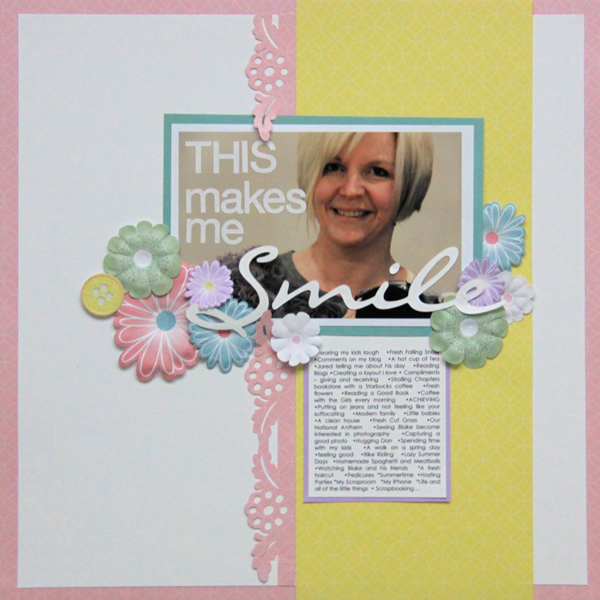
I'm a fan of simple pages. Some scrapbook extraordinaires think that simple pages mean boring pages, but that's not necessarily true. This is the perfect example of a simple page from Scrapbook.com. that makes me want to smile. Although usually I would encourage more than one picture on the page, there are several reasons that I would recreate this page.


The first thing that caught my eye was the Creative Memories Paper Flowers and Paper Buttons. The flowers and buttons shown are the Fabulous color theme but there are several to choose from. Recently a client who normally uses flowers from another manufacturer on her page, shared with me how surprised she was that she liked the flowers from Creative Memories. She loved how easily they adhered to her page and the fact that they laid flat. Most other flowers leave your album page all bulky, get just a few pages with flowers and that makes for an awkward book when you try to close the album.

I love this border that was created, but I don't know where it's from.  I can't wait for Creative Memories to come out with a beautiful border like this for our Border Making System. In November, they are introducing two new Christmas borders, and although they are cute, I personally want a more feminine border like this one. 

Most importantly, and probably the reason this page is not boring is that story, It's intriguing me because I seriously want to know what makes her smile!  The story, which leads you a little bit into her personality is the most important part of this page. Create a little journal box like this one, it makes it easier to write if think you only have to fill a small area. As beautiful as this page is, I want to know more about her, which is what your families are going to want when they look at your albums, so don't forget to write on your pages.  

This is the legacy, the pictures and the story, don't leave it out.


Monday, May 9, 2011

30 Minute Scrapbook??

Creative Memories is always helping us by promoting the products and supplies that we sell and today I again was reminded just how easy it can be to create a Scrapbook photo album.  Using the quick fun products from Creative Memories I can show you how to quickly make a keepsake album that you and your loved ones will cherish.
Check out Nancy O'dell and Creative Memories Hummingbird line on Rachel Ray Show I hope that you will be inspired to give it a try.  You can see the beautiful products shown at my website www.mycmsite.com/deeanna and if you would like encouragement and inspiration give me a call.

Don't make it hard when it can be simple.

Happy Scrappin'

Saturday, January 8, 2011

New Beginings

Well the brand new year is off and running and there is so much to look forward to. I'm confident that this year will bring many picture taking opportunities for my family and can't wait to share those moments with you.

I'm not real big on new year resolutions because they always seem to get broken and then I usually feel bad. Why set yourself up for "bad" feelings?  I'd rather not, thank you!  So I've decided to start the new year with a new outlook and a new beginning, and whatever blossoms from that, will be new and exciting!

What better way than to gather your pictures and start a brand new photo memory project, or continue an old one?  It doesn't have to be extravagant, just start.  We take all these great pictures throughout the year and most of them are hidden in our computers or on memory cards!

I love scrapbooking, but the reality is with a job, house to keep, 3 daughters and a brand new granddaughter on the way, I can get overwhelmed with several scrapbook projects going at one time. I don't have time to "scrapbook" everything, and frankly, when I get overwhelmed, I don't want to scrapbook anything! I totally understand the "I don't have time for that" comment from so many! That's why I love Creative Memories' Picfolio Milestones albums. It wasn't always so, I had an aversion to this type of album when it was first released because it wasn't a scrapbook album. What were they thinking? But acceptance has come....It's so easy to quickly slide my pictures in, share the story on one of the precut papers from an album kit and before I know it my family pictures are in albums for us to enjoy. No Guilt....Just Albums!

See how easy it can be!


Watch, Enjoy, and then give me a call or visit my website to begin celebrating your new beginning with a new album.


Tuesday, October 12, 2010

Scrapbook Title Page

Creating the perfect opening page for your album projects has always been a dilemma.  I want the design to encompass the overall album theme and yet be pleasing to the eye.  Even having a catchy phrase can make me smile.  It's always difficult, but I've finally figured out the secret...DON'T OVER THINK IT!

Actually that thought can be used many times in scrap booking.  I noticed that Creative Memories has Album intro page ideas in our project center so I thought I'd check them out and share with my scrapping friends.  You can access the complete idea page here but my favorite is this vacation intro page.  I like the mix of bright colors but mostly the timeless feel of the black and white pictures.  
You can find the directions for creating this page on my website at www.mycmsite.com/deeanna and visit the project center, or by clicking here.  Remember you can create all the traditional scrap book ideas shown here digitally, by using Creative Memories Storybook Creator Plus 3.0 digital scrapbook software. 

Sunday, August 8, 2010

Even Nancy O'Dell can find time to scrapbook!

Where to start!  There's so much going on in the scrapbook world with Creative Memories I just couldn't figure out where to start.   There were several exciting announcements made this last week during Creative Memories Creative Memories National Convention, and I've been sorting through trying to decide what to tell you first. I decided on an announcement that is actually an upcoming event, because I felt it really did cover the WHY of Creative Memories.  As a scrapbook fanatic you may run into others who just don't understand your passion for memory keeping, and although we know our reasons for making albums, sometimes it helps to hear it from someone else.  Expecially someone who is so busy that we can't even imagine her having time to scrapbook, but because she understands the importance and benefit to her children she makes the time.

Nancy O'Dell of Access Hollywood fame, has written her second book, this one called "Full of Love" highlighting the the importance of keeping Scrapbook memory albums and is also introducing a brand new Hummingbird Scrapbook line offered by Creative Memories. Click Here and check out the news interview with Nancy and the sneak peak of the Hummingbird line from Creative Memories National Convention.

Saturday, May 8, 2010

No More Throwing Money In The Trash for Me!

Creative Memories Tag Maker has many different uses, not only can you decorate your scrapbook pages and hand made cards but I really have second thoughts about EVER purchasing another greeting card. 

If you're a mom of school age children, you'll totally understand what I mean when I say that you have "sticker shock" when visiting the card section after picking out one of the MANY children's birthday gifts for the MANY birthday party's your child will attend.  Then, to watch that card you spent $4.00 or more on, be tossed to the side so the child can get to the perfect gift you brought, is a little frustrating. Plus, you KNOW (cause we do it also) in a few days that card will find it's way right into the trash can.  You might as well just throw your money in the trash now! 
SOLUTION: I love this tool to add an adorable little "to/from" tag to all my birthday gifts. It will definately save you money on birthday cards, AND you'll find it handy for cards and scrapbooking too!  ps....you can create your tag with or without the hole, so you can attach it with your Creative Memories Adhesive or add a ribbon for hanging.

Take a look at this quick tag for Mom and for more creative ideas with the Creative Memories Tag Taker visit the project center at my website you'll find a whole area dedicated to ideas for the Creative Memories Tag Maker.

Friday, March 26, 2010

Tips For Organizing Your Digital Pictures

Organize Your Digital Images -
The age of digital pictures has surely changed the way we take pictures.  Since we can now see our photo prior to printing and are not limited to 36 images on a roll of film, we are taking more and more pictures. For the most part, these pictures are all keepers....those pictures taken with odd faces and closed eyes are filed in the trash can of your camera, before they even hit your computer.  As your photo library grows, it is important to keep your photos organized in a way that makes sense for you and your lifestyle. Random folders, full of random photos, won't do you any good when you decide to search for that family photo from the reunion three years ago or your daughter's preschool pictures.

Memory Manager is an amazing software to help you keep your photo's organized, but it's not just limited to organization, it also contains some powerful editing tools, (just like the pro's use) and an album organizer too.
In Memory Manger you no longer need to spend hours organizing images (or any media) in several different folders just to find the one you need. No opening up several folders,  or guessing which month or year for that matter, that you took that picture of your daughter wearing that silly birthday hat.  Using Memory Manager you can be staring at that picture in a few short seconds. 

Back Up Your Photos -
Once your photos are organized on your computer, it is very important that you back them up somewhere else. It is inevitable, one day, something will happen to your computer: it will crash, your toddler will step on your laptop and break it, or something else that you cannot predict, and all your photos will be lost...unless you have them backed up somewhere else. Thankfully, Memory Manager comes with an automatic back up feature. The backup tool automatically saves your photos, and any changes or additions that you make to your memory vault, so you don't have to remember.  I suggest you invest in an external hard drive that you can copy all of your photos to, they are reasonably priced these days and have great storage capacity. Yes, CDs and DVDs work but those run a greater risk, as they may deteriorate over time, and may one day become as obsolete as vinyl records or cassettes. My recommendation? Memory Manager and don't worry about remembering to back up your photos, just know it's taken care of.

Share Your Photos -
Nowadays, our photos are not just on our cameras and computers; we love to share them with friends, make slide shows for our social media sites, and send emails to family members too. Yes these taskes are easy with Memory Manager, but more importantly, I'd like to caution you, you are taking a chance trusting your precious photos to ANY online site.  You will be not only giving up control of the safety of your photos to someone else but MANY sites change the resolution of your images upon upload, and the picture will NEVER print with the same quality and clarity as your original camera image.  So, of course, share your pictures but do not rely on someone else to guard your precious memories!!!

Order Your Photos -
Ok, you've come this far! Once you've taken the time to use your camera, taken some great photos, organized and edited them, kept them safe with automatic back up, shared your photos with family, and uploaded them to Facebook or some other social site, we now come to the best part; ordering your photos! I have two pieces of advice when it comes to ordering. First, order any prints you like as soon as you upload them to your computer. Next, when you capture something that is very unique, catches your eye, or you know that picture of your child is going to ba a favorite, order a large print right away. If you don't order it immediately, it will just stay on your computer forever. Your life is too busy to remember to order it later. The printed picture is STILL the best way to preserve your memories safely.  Creative Memories has several options for keeping these printed photos organized, safe and enjoyed by your family.  If you've spent all this time and money just to take pictures of the special moments of your life, WHY on earth would you just leave them sitting on your computer?  So don't procrastinate, visit Creative Memories Digital Center and upload your pictures for printing and enlargements. Unlike other photo processors (Walmart, Costco, Snapfish, Kodak and many, many more) we DO NOT, change the resolution of your photo image, and we use high quality photo paper to process your pictures, so you'll love the quality of your prints. 

Don't keep making promises to yourself about getting your photos organized. Keep it simple, and give me a call for help. Contact me here and if you would like to learn more about Memory Manager 3.0 click here to watch a video and see just what you can do

Saturday, March 20, 2010

Digital Recipe Cards

I thought I'd share these adorable recipe cards that my daughter created using Storybook Creator Plus 3.0 She will be adding the 4x6 custom recipe cards to an adorable recipe box. During the Christmas season, one of my girls wanted to do something nice for a woman friend.  She wrapped up a group of recipes, tied them with a rafia bow, and gifted them to the friend, who absolutely loved them.  She was always looking for good recipes to make for her son. Recipe cards are quick and easy to create using Storybook Creator Plus and what a great gift idea. My belief is that a gift of the heart makes the recipient feel special and when you can quickly personalize them too that makes it even better!
Now don't steal the recipes that are listed here (hehe) but check out how cute they are and think of Creative Memories when you want to create a personalized gift!

Friday, March 19, 2010

Delighted With Digital

I once again have determined that I love Digital Scrapbooking. Oh, I also love traditonal scrapbooking and I don't ever imagine myself not scrapbooking but the idea that you can take pictures on Friday, have a full weekend, including a full day of work on Saturday, church and family lunch on Sunday and still quickly edit, create, and post completed pages for your friends and family to admire by Sunday evening is awesome.  No worrying about developing the pictures, dragging supplies out or even having the needed scrapbook materials on hand, it's really no mess, no fuss!  I love, love, love it. 
Here are the pages I completed in a little less than a 1/2 hour so on Sunday.

I designed these pages for my mom, she lives in another state and I periodically send her pages for her enjoyment.  She hangs them on her Everyday Display until she gets a new one and then slides it into a 12x12 Picfolio Max album. 

I love that she can enjoy pictures of her grandchildren and before she knows it she'll have a full photo album of digital scrapbook pages.


My favorite part....if I decide that I really like one of the pages that I created, I can just order a second copy for myself!

Ah! The beauty of digital!

Creative Memories Storybook Creator makes digital scrapbooking easy. The creative flair that it allows and the easy user friendly tools are amazing; the program shines high above other options.

Wednesday, March 3, 2010

Making A Candy Bar Wrapper

Ever need a quick inexpensive gift? For me it's usually my teenage daughter wanting to acknowledge a friends birthday.  The other day she purchased a BIG Hershey's Dark Chocolate bar for a birthday gift. It was a good idea, the friend loves chocolate, (actually what teenage girl doesn't) but we found a way to "cute it up" a little and make it personal.

It was super easy with some of the tools from Creative Memories. The first thing and possibly the most difficult is choosing a color scheme for your candy bar. We chose the brand new Simply Beautiful palette for it's bright colors.   
We measured the width we needed to cut the paper for the wrapper, to make it easy you can remove the Hershey's paper and measure the original wrapper to get just the perfect fit.  For our project we needed to cut our wrapper from the middle of the piece of scrapbook paper as the sides were a lighter color. If you do not have this situation it is best to measure in from the side of the paper and cut at the width desired.


We used the 12" Rotary Trimmer to cut our paper. It easily fits and is able to measure accurately a 12x12 piece of paper. Lift the arm slide the paper in, there is a measuring arm for large pieces and once you measure you roll the blade along the guide for a quick, clean accurate cut.


 Measures up to 12 inches with swing out arm 
Once you are done cutting wrap your candy with the decorative paper wrapper and adhere it together with a Tape-Runner adhesive or Photo-Splits  adhesive. Make sure you choose a good adhesive as this will be holding your project together!


Ta Da! It already looks better! Next we embellish the candy, here we used a strip of paper ribbon from Creative Memories. Cut it to fit and adhere with the tape runner again.


Next we chose a couple of Paper Flower embellishments again from the Simply Beautiful color palette as they all coordinate with our paper.  (click the above link and watch a video on all the options with this palette) Everything coordinating is important because spending time choosing the perfect color match is time consuming.  I love that it all flows together!


.

Adhere the paper flower with the tape runner

Layering flowers adds color, texture and dimension to your project I highly recommend it!


Again choosing from the embellishment line of the Simply Beautiful palete we picked a coordinating paper tag from the package and adhered it to the front of the candy with foam squares adhesive. 


Foam squares is a dimensional adhesive that gives a 3 dimension "pop out" look to projects.  Here we placed one square under the top right of the tag. Foam squares are COMPLETELY safe for all projects even pictures, unlike other pop adhesives on the market, you can feel comfortable placing them right under the corners of your precious pictures.

We also added a little bling to the center of the flower. We chose a Swarovski crystal but another option would be a button or colored brad, you could even just decorate it with some cute dots make with a colored pen.


Lastly, personalization is the key, my daughter added her birthday sentiment and number stickers for decoration. You guessed it...they also coordinate, we used the Simply Beautiful Birthday Additions Stickers.


In about 10 minutes we had an inexpensive personalized gift.  I loved it and so did my daughter.  You can create candy wrappers in any color scheme and for any event.  I even awoke this morning and thought...."oh! I can create Easter wrappers for the Easter baskets!"  I was so excited...and before you say it....I know, I'm a little addicted!

Friday, February 26, 2010

Free Digital Scrapbook Software

Are your digital photos trapped on your computer hard drive or in your digital camera? Have you ever wondered what you'd do if the inevitable happened and your computer crashed? Too often the photos taken on digital cameras are never printed. We usually worry about losing our photos and albums in a fire but a computer crash is far more likely to wipe out people’s memories.The best way to make sure that your photos are safe is to print them.  That doesn't mean that you need to have boxes of photographs hiding in your closets. Why not showcase a few in beautiful digital photo books like the one below.

It's so nice to have choices when it comes to your photographs. These storybooks are easy to create and flexible for your every need. They come in 4 different sizes, both soft and hardcover. Creative Memories Storybook Creator 3.0 free program can be dowloaded directly from my website and it's FREE!  Storybook Createor 3.0 can be used to create fixed frame storybook photo albums but if you are looking for flexibility and creativity then you'll want Storybook Creator Plus 3.0.  Start with predesigned pages then add digital artwork to make them your own, or start with a blank canvas. Creative freedom is yours. Your imagination can only dream of the things you can do with this award winning program.

Every day holds a new story, a new memory and digital scrapbooking is a way to keep track of these moments – big and small. And StoryBook Creator Plus is the software that makes it not only possible, but fun and easy too.
Before you know it, you'll be off and running to create photo books, wall prints and other photo gifts like the items below.


Remember if you would like your photos in books but don't have the time to see it through, don't forget that you can provide the images and I'll provide the finished piece for you.

Contact me by clicking here , I'd love to answer your questions and get you pointed in the right direction.

Monday, February 22, 2010

Got Boxes And Drawers Full Of Pictures?

Are your pictures in drawers and boxes, or maybe they're in a closet or under the bed?  Don't feel like your alone.  As a Creative Memories Consultant, I've talked with many people, and have found that when it comes to printed pictures, these places rank #1. If you're one of those people who get overwhelmed just thinking about what you would do to organize them, I can help!

I can show you how to organize your printed photos using our Power Sort products. These durable photo safe products make organizing and finding those special memories do-able. I've created a system to help you quickly sort your boxes of photos into smaller workable groups, and finally neatly organized and labeled into the individual compartments of the Photo Sort Box.  Click here to watch a quick video and learn a few more details.

After you're pictures are organized and safely stored you can decide to continue to store them or take the next step and get them (at least a few of them) out of those boxes and into your life. We all love looking at family pictures why not enjoy yours.  If you have heard about Creative Memories you surely know about our scrapbooking options, but Scrapbook Albums are not for everyone. How about sliding your favorite photos into our pocket-style PicFolio™ Albums or maybe you like that Traditional Scrapbook look but just don't have the time or patience. Maybe a Traditional Quick Kit Album is more along your line. The pages completed for you, all you need to do is add a couple pictures, write your story and your done!

Whatever your preference, I can help you every step of the way and ensure you have hundreds, or maybe its thousands, of photos stored and shared with ease.  Contact me for help.
It's Your Life, Your Story, Your Way.

Sunday, February 21, 2010

Where Are Your Digital Pictures?

I can help you...

Organize and edit your digital photos.  Are you overwhelmed with your digital photos? Did you know theres a better way to organize than all those folders on your computer?  Not sure where to begin with sorting and filing them? I can help you get started with Creative Memories’ software for editing and organizing your digital images on your personal computer. Memory Manager is the best thing that could happen to your digital pictures. You’ll be able to easily locate your photos and incorporate them into beautiful table top Storybooks and other photo gifts. Ask me about free 24/7 online learning, or contact me for individual help in loading your software and learning how to use it.

If you're saying..."well this looks great for my digital pictures, but I have tons of pictures in boxes and drawers", stay tuned for great orginizational ideas for your printed pictures or contact me for a personal consultation.

Saturday, February 20, 2010

In the beginning....

For my first post I decided to share a little about my vision....if you can call it a vision.  I seriously am not sure what I'm doing with this blog idea.  I want somewhere to share my ideas and thoughts and also share how to create.  Create? you ask?  Create what?  Well that's where my vision gets blurry.  I started a blog in an attempt to accommodate both my personal story and my creative ideas, but that has turned into more of an inspirational, "life as I see it", blog. This blog, the one your are reading now,  will be more on the creative side because I love to scrapbook, both digitally and traditionally. I'll be sharing ideas here, but more than just sharing, I'd like to offer my services to you.  To create cards, pages and scrapbooks for your personal needs.  I hope you will find what I offer here to your liking.  In the meantime, You can visit my personal blog at www.designingdee.com if you'd like to get to know me better.  Don't forget to stop back by and see what's happening here.